HeidiSQL for Raycast
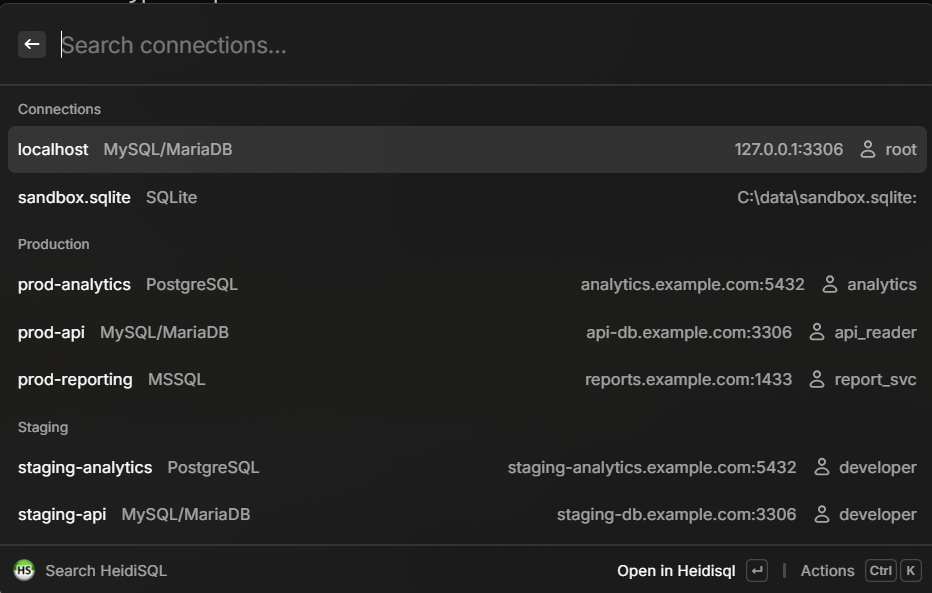
I use HeidiSQL daily, but opening the session manager, finding the right connection, and double-clicking always bugged me. So I built this Raycast extension that reads my saved sessions straight from the Windows Registry and lets me search and open them from Raycast. The extension lists all sessions grouped by folder — just like in HeidiSQL — and supports MySQL, PostgreSQL, MSSQL, SQLite, Firebird, and ProxySQL. Selecting a session launches HeidiSQL with the right command-line arguments, so you land directly in the chosen database.
A small Raycast extension that reads saved HeidiSQL sessions from the Windows Registry and lets you search and open them directly.
Features
- Search & filter connections by name, host, user, or database type
- Open in HeidiSQL — launch directly into the selected session
- Copy host, password, or session name to clipboard
- Grouped by folder — sessions are organized just like in HeidiSQL’s session manager
- Supports MySQL, PostgreSQL, MSSQL, SQLite, Firebird, and ProxySQL
How It Works
The extension reads saved sessions from the Windows Registry:
HKCU\SOFTWARE\HeidiSQL\Servers\Each session’s connection details (host, port, user, database type, etc.) are parsed and displayed in a searchable Raycast list. Selecting a session launches HeidiSQL with the appropriate command-line arguments.
The path to heidisql.exe is auto-detected from Program Files, but can also be set manually in the extension’s preferences.